
Hub, Timing, and Drift run with your game server.
One plugin suite. In-game and Discord.
Assetto Corsa Server Plugins
for Timing, Drift & Discord
AssettoLeaderboard Hub, Timing, and Drift connect your Assetto Corsa server to ServerHub. Show live server status in Discord, then publish timing and drift leaderboards both in game and to your community.
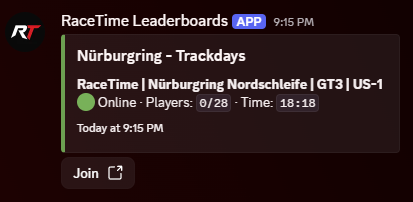
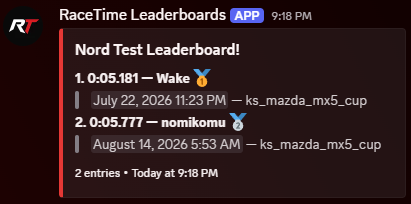
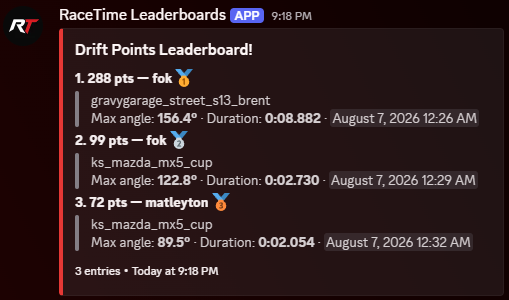
How everything connects
From the track to your Discord
The Hub plugin maintains the ServerHub connection. Timing and Drift use that connection to make server activity and results available wherever your drivers are.
Receives authenticated server presence and leaderboard results.
Drivers see server status, timing boards, and drift rankings.
The plugin suite
Made for AssettoLeaderboard
All three packages are maintained by us and distributed through the managed plugin system.
Connection layer
AssettoLeaderboard Hub Plugin
AssettoLeaderboardHubPluginThe Hub plugin is the bridge between AssettoServer and ServerHub. It keeps the server connected and lets the Assetto Corsa Discord bot display whether the game server is online and available. Use the Discord server-status guide to configure the live command.
- Live server status for Discord
- Authenticated ServerHub connection and server identity
- Shared connection for Timing and Drift results
- Managed updates that preserve existing connection settings
Timing and stages
AssettoLeaderboard Timing Plugin
AssettoLeaderboardTimingPluginCreate circuit laps, point-to-point stages, and ordered checkpoint routes. Drivers can follow leaderboard results through the in-game display while the same competition continues in Discord. Follow the timing leaderboard setup guide for the complete workflow.
- Closed-loop laps and open timing stages
- Ordered checkpoints and anti-shortcut timing lines
- Timing leaderboards in game and Discord
- Stage Builder for capturing routes without typing coordinates
Drift competition
AssettoLeaderboard Drift Plugin
AssettoLeaderboardDriftPluginTurn drift sessions into a persistent competition. Capture and validate runs, show the leaderboard in game, and share the same rankings with your Discord community.
- Drift scoring with configurable validation
- Optional drift zones for focused competition areas
- Drift leaderboards in game and Discord
- Managed configuration and package updates
Inside Assetto Corsa
Live information while you drive
Timing and Drift provide focused in-game displays so drivers can follow the run, compare the leaderboard, and see scoring feedback without leaving the track.
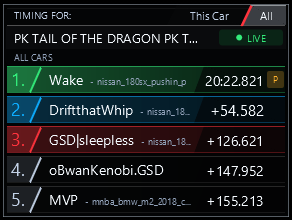
Timing plugin
Live Leaderboard
See current positions, completed times, and gaps to the leader. The leaderboard saves and displays past times for a specific car or across all cars.
Timing plugin
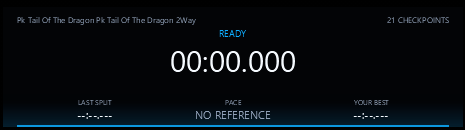
Run Timer
Follow the timer, checkpoint count, latest split, current pace, and personal-best comparison throughout a run.
Drift plugin
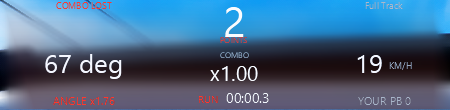
Drift Scoring HUD
Track live points, combo multiplier, drift angle, speed, run duration, and personal-best progress.
Install from the dashboard
Add Timing or Drift to a connected server without manually moving package files.
Keep configuration intact
Managed updates replace package files while preserving leaderboard, stage, zone, and connection settings.
Update when a release is ready
The plugin manager shows an update button only when a newer first-party package is available.
AssettoLeaderboard
Connect the server. Build the competition.
Open your Discord bot dashboard, connect an Assetto Corsa server to ServerHub, and manage all three plugins from one place. Follow the Assetto Corsa server plugin installation guide for the complete managed workflow. Setting up your first lobby? Read the Assetto Corsa server setup guide or start with a free server.