Capture
Park at each timing line and record its position and permitted direction.
 Assetto Servers
Assetto Corsa Timing Stage Builder
The Assetto Corsa Timing Stage Builder captures your live position and facing direction for a start gate, ordered checkpoints, and a finish gate without manually copying coordinates. It then creates the YAML configuration you can paste directly into the shared Stages editor in Timing or Live Map.
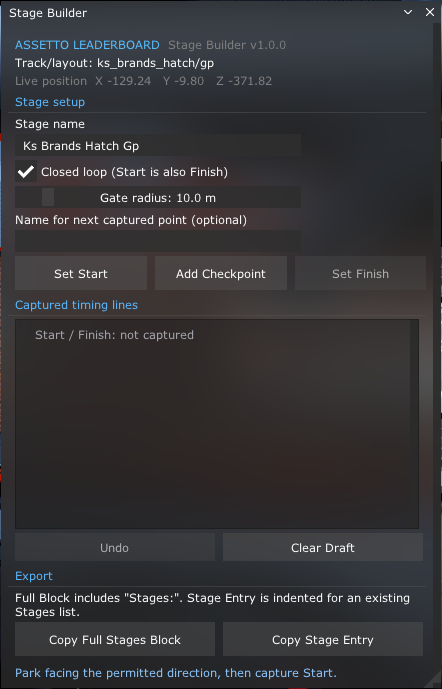
Park at each timing line and record its position and permitted direction.
Check the ordered start, checkpoint, and finish lines before exporting.
Copy the generated YAML into the Timing plugin and save your configuration.
Setup workflow
Create the route in the same order drivers will cross it. The direction your car faces when capturing a line determines the permitted direction of travel.
Start an Assetto Corsa session on the exact track and layout used by your server, then open Stage Builder. Confirm the track/layout shown at the top is correct.
Enter a clear leaderboard name. Enable Closed loop when the start line is also the finish line, and choose a gate radius wide enough to cover the racing surface.
Park on the start gate while facing the permitted driving direction, then select Set Start. Stage Builder records both your position and forward direction.
Drive to each anti-shortcut checkpoint, park facing the route direction, optionally enter a checkpoint name, and select Add Checkpoint.
If the stage is not a closed loop, capture the finish gate with Set Finish. Closed loops automatically use the start gate as their finish.
Use Copy Full Stages Block for a new configuration, or Copy Stage Entry when adding to an existing list. Paste it into the shared Stages editor in Timing or Live Map, or Leaderboard Drift’s Zones editor, and select Save Changes. Timing and Live Map share the same saved stages. Drift converts Stage Builder output into its separate checkpoint zones automatically.
Builder controls
Export preview
The generated block contains the stage name, loop mode, timing-line positions, forward points, and gate radiuses in the format expected by AssettoLeaderboard Timing. After the plugin records a valid run, its timing leaderboard can also reach Discord through the Assetto Corsa Discord bot and ServerHub connection.
Stages:
- Name: Brands Hatch GP
  ClosedLoop: true
  Checkpoints:
  - Name: Start / Finish
    Position: { X: -129.24, Y: -9.80, Z: -371.82 }
    Forward:  { X: -127.24, Y: -9.80, Z: -371.82 }
    RadiusMeters: 10
  - Name: Anti-shortcut checkpoint
    Position: { X: 100, Y: 0, Z: 0 }
    Forward:  { X: 102, Y: 0, Z: 0 }
    RadiusMeters: 10
Before saving
Drivers must cross checkpoint entries in the same order they appear in the exported configuration.
The forward point prevents drivers from triggering a line while travelling in the wrong direction.
After saving and restarting, complete the route once to confirm every timing line triggers correctly.
Stage Builder v1.0.0
Download the ZIP, drag it into Content Manager, choose Install, and enable Custom Shaders Patch before opening Stage Builder from Assetto Corsa's right-side app bar. Follow the complete Assetto Corsa timing leaderboard guide, review the full Assetto Corsa server plugin suite, follow the server setup guide, or start a free Assetto Corsa server before adding the Timing plugin.