
The quick answer
How do you put an Assetto Corsa drift leaderboard in Discord?
Discord Bot Plan required: You must purchase and activate the Assetto Corsa Discord Bot Plan before you can connect ServerHub, install Leaderboard Drift, or publish a drift leaderboard in Discord.
Connect your Discord bot and game server to ServerHub, then install Leaderboard Drift from Manage Plugins. Choose a leaderboard name, scoring and validation settings, enable the CSP HUD, and use either the full track or named drift zones. After one accepted run reaches ServerHub, use /drift-leaderboard in Discord, choose the leaderboard and track-zone combination, and post the board. The bot updates that message as new accepted scores arrive.
Test scoring on the exact car, track, layout, CSP requirement, and validation mode that your public server will use before announcing the leaderboard.
Prepare the Discord bot and ServerHub connection
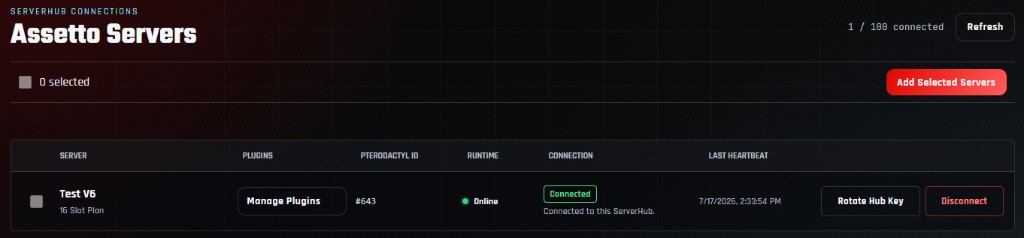
Drift results travel from the Assetto Corsa server through ServerHub to the hosted Discord bot. Finish the Discord bot setup guide first, then confirm the correct game server is connected and reporting a recent heartbeat.
Active Discord planThe hosted bot plan must be purchased and running.
Bot connectedThe bot should be online in the intended Discord server.
ServerHub heartbeatThe selected Assetto Corsa server should report Connected.
Manage Server permissionThe member posting the board needs this Discord permission.
If you host several lobbies, verify the server name before opening Manage Plugins. Each server has its own Drift configuration and results source.
Install and enable Leaderboard Drift
Select Manage Plugins beside the connected server, find Leaderboard Drift, and install it. ServerHub is installed as the required connection plugin and remains responsible for delivering accepted results to the bot. For the complete panel workflow, see how to install Assetto Corsa server plugins.
- 1Open ServerHub Connections.
Choose Manage Plugins on the server that will host the drift competition.
- 2Find Leaderboard Drift.
Install the managed package and wait for the panel to finish.
- 3Open its settings.
Confirm ServerHub is connected before enabling the Drift plugin.
- 4Choose a clear board name.
This name appears in the Discord command's leaderboard choices.
You can run Leaderboard Drift by itself or beside the Assetto Corsa timing leaderboard. Both use the same ServerHub connection but keep separate results.
Configure scoring and run validation
Start with the plugin defaults and change one rule at a time. The default WheelsOutsideAndCspDriftValid mode uses CSP's native drift state and combo while the server still enforces collision, reset, teleport, telemetry-gap, disconnect, and session-change safeguards.
- Minimum and Maximum Angle: define the angle range used for drift scoring and the native angle bonus.
- Native Maximum Angle Multiplier: sets the largest angle bonus applied to new positive native score gains.
- Minimum Drift Duration: rejects very short attempts that should not reach the leaderboard.
- CSP Validation Mode: choose native CSP scoring, server scoring with wheels-outside checks, or server-only scoring.
- Collision Report Grace: waits for delayed wall-contact reports before accepting a finished run.
- Maximum Sample Distance and Interval: reject suspicious movement jumps and telemetry gaps.
Changing the CSP validation mode can change how points are calculated. Reset expectations or start a new leaderboard name when making a major scoring change.
Choose Disabled when you want the server formula without client-reported CSP drift scoring. Choose WheelsOutside for that formula plus CSP track-limit reports.
Require CSP client messages and enable the drift HUD
For the live HUD and either CSP-assisted validation mode, configure the server to require CSP 0.1.77 build 1937 or newer. In the Drift plugin, enable CSP Client Messages and Enable CSP HUD. Keep Notify Players on if you also want accepted or lost-combo feedback in server chat.
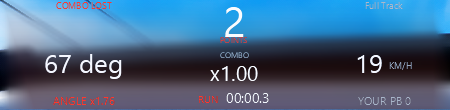
- The center value shows the current points and combo.
- Angle, speed, angle bonus, duration, personal best, and active zone help validate the setup.
- Three or four wheels outside cancels the combo in either CSP-assisted mode.
- A missing or stale client report fails closed when CSP-assisted validation is enabled.
Without the server-side CSP minimum, AssettoServer may reject the client messages needed by the live HUD and CSP-assisted validation.
Use the full track or configure named drift zones
Leave Drift Zones empty for a whole-track Full Track board. To split a large map into separate competitions, add named circular zones using coordinates captured from CSP Object Inspector. Each accepted result is associated with its track and active zone, which becomes a selectable option in the Discord command.
Full TrackBest for one drift route or a simple server-wide points board.
Named zonesBest when one map contains several drift areas or layouts.
Useful radiusCover the intended area without overlapping an unrelated section.
Clear namesUse short names drivers will recognize in Discord's zone choices.
Publish a Full Track board first. Add zones only after one accepted run proves the scoring, connection, and Discord workflow all work.
Save, restart, and record one valid drift run
- 1Enable the plugin.
Confirm Leaderboard Drift reports Enabled, then select Save Changes.
- 2Wait for the restart.
Let the Assetto Corsa server return to Online and confirm a fresh ServerHub heartbeat.
- 3Join with the required CSP version.
Confirm the drift HUD appears and names the expected Full Track or configured zone.
- 4Build and finish a clean combo.
Stay inside the speed, angle, collision, wheel, telemetry, and duration rules.
- 5Wait for acceptance.
The collision grace period must finish before the result is stored and sent through ServerHub.
Hit a wall or violate the configured validation rule and confirm the bad run does not appear. A leaderboard is only trustworthy when rejection works as well as acceptance.
Post the drift leaderboard in Discord
In the destination Discord channel, run /drift-leaderboard. Select the leaderboard name configured in Step 2 and the desired track - zone source. The command defaults to 10 entries, accepts 1 through 25, and can use an optional custom title.
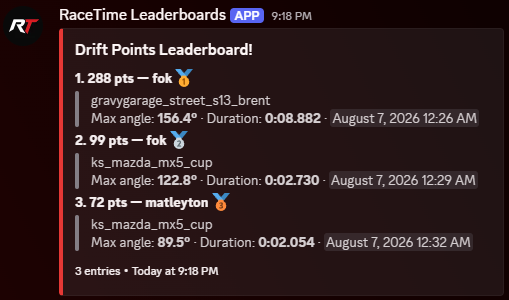
- leaderboard: select the Leaderboard Name saved in the Drift plugin.
- zone: select the track and Full Track or named-zone combination.
- num-entries: choose 1 through 25; omit it to show 10.
- title: optionally replace the default heading with your event or community name.
Only a Discord member with Manage Server can create the persistent leaderboard widget. The bot also needs permission to view the channel, send messages, embed links, and edit its message.
Verify automatic updates and fix common problems
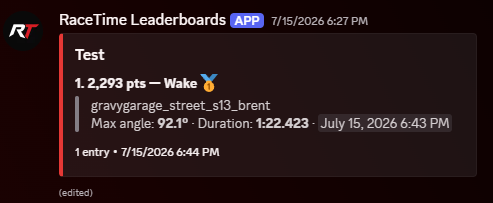
Complete a second accepted run and confirm the existing Discord message updates rather than requiring another command. If a Steam profile is linked to Discord, the result can show a non-notifying Discord mention. Otherwise, the saved driver name identifies the entry.
| Problem | What to check |
|---|---|
| No leaderboard choices | Confirm Leaderboard Drift is enabled, the server is connected to ServerHub, and at least one accepted run exists. |
| HUD never appears | Require CSP build 1937 or newer, enable CSP Client Messages and the CSP HUD, then reconnect the driver. |
| A score disappears | Check collision grace, wheels outside, CSP drift validity, resets, teleports, sample gaps, and minimum duration. |
| Wrong track or zone | Re-run the command and select the exact track-zone source produced by the intended server. |
| Board does not update | Check the ServerHub heartbeat and the bot's permission to view, send, embed, and edit messages in that channel. |
| Scores feel inconsistent | Confirm every driver uses the same server configuration and that the validation/scoring mode was not changed mid-competition. |
Frequently asked questions
Assetto Corsa Discord drift leaderboard questions
Does the Discord leaderboard update automatically?
Yes. The bot saves the widget and edits the existing message after ServerHub receives accepted Drift scores for its selected leaderboard and track-zone source.
Can I make separate boards for different areas on one map?
Yes. Configure named Drift Zones, record an accepted result inside each zone, then select the wanted track-zone combination when running the Discord command.
Do I need the Discord Bot Plan?
Yes. The Assetto Corsa Discord Bot Plan hosts the bot and enables the ServerHub/plugin workflow used to publish and update the board.
Can I use both timing and drift leaderboards?
Yes. Leaderboard Timing and Leaderboard Drift are separate plugins that can run beside each other on the same connected game server.
Why was a high-scoring run rejected?
The final score can still fail collision grace, wheels-outside, CSP validity, reset, teleport, telemetry-gap, disconnect, session-change, or minimum-duration checks.
Turn drift runs into a community competition
Put your Assetto Corsa drift scores in Discord
Connect ServerHub, validate one clean run, and publish a leaderboard that updates as your drivers improve.