
The quick answer
How do you change weather and time on an Assetto Corsa server?
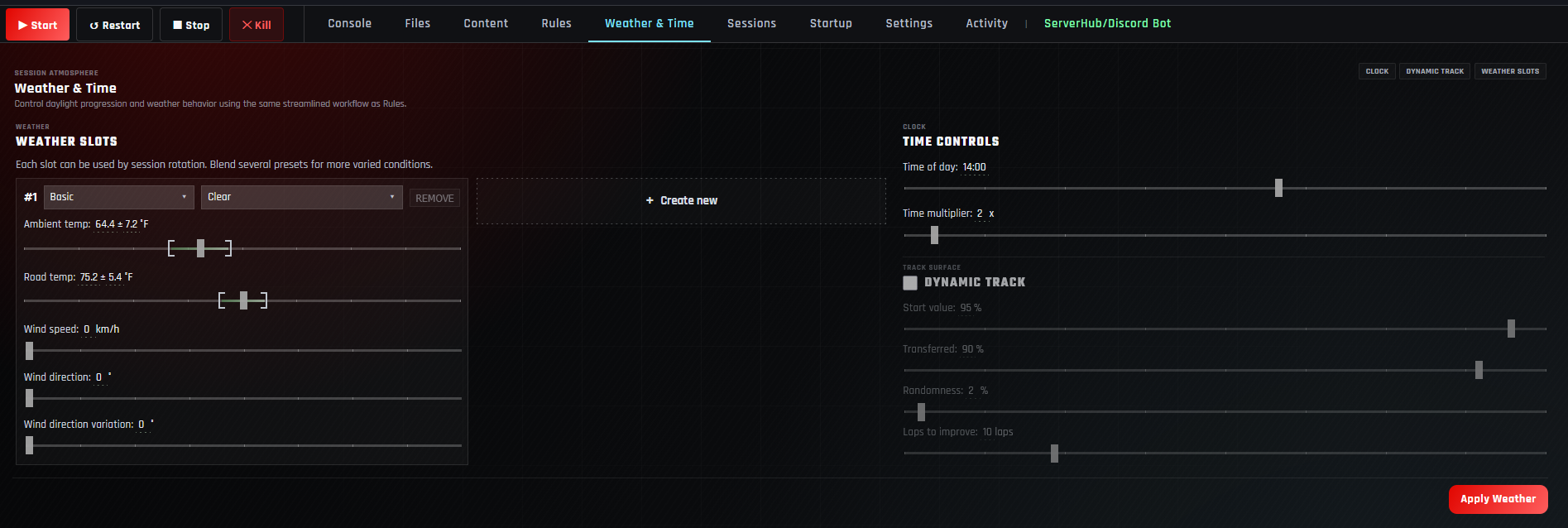
Manage the server and open Weather & Time. Set the time of day and time multiplier, choose Basic or Weather FX for each weather slot, select the condition, and set ambient temperature, road temperature, wind speed, direction, and variation. Enable Dynamic Track when the grip level should evolve, then set its starting grip, transferred grip, randomness, and laps to improve. Press Apply Weather, restart the server, and test the conditions.
Use one clear Basic weather slot and a 1x time multiplier for the first test. Add changing conditions only after every driver can load the baseline event correctly.
Open Weather & Time and review the whole event
From My Servers, manage the intended lobby and select Weather & Time. The page combines the clock, dynamic-track behavior, and weather slots applied to the server.
Use the practice, qualifying, and race sessions guide so the weather test matches the event’s actual duration.
Set the time of day and time multiplier
- 1Choose Time of day.
Set the intended starting clock time and consider visibility, sun position, and the length of the event.
- 2Set Time multiplier.
Use 1x for normal progression or a higher multiplier when the event should move through daylight faster.
- 3Check the finish time.
Estimate how far the clock will advance across practice, qualifying, and the race.
Accelerated time can move the race into low visibility faster than expected. Complete a short test at the same start time and multiplier.
Choose Basic or Weather FX and build the slots
Every weather slot has an engine mode and condition. Keep one slot for fixed, predictable conditions, or use Create new to add variety to the session rotation.
BasicUses the standard condition list and is the safest starting point for a compatibility test.
Weather FXProvides the expanded condition system for drivers using a compatible Custom Shaders Patch and weather setup.
ConditionChoose Clear, clouds, overcast, rain, or another option available for the selected engine mode.
Create newAdd another slot only when the event should rotate or blend more than one condition.
Do not assume every driver has the same CSP or weather configuration. Publish the requirement and verify the chosen preset on a second computer.
Set ambient temperature, road temperature, and wind
The temperature controls use a target plus variation range. Wind adds speed, direction, and directional variation to each weather slot.
| Setting | What it affects | What to verify |
|---|---|---|
| Ambient temp | The air-temperature target and variation. | Use plausible conditions for the event and track. |
| Road temp | The track-surface temperature target and variation. | Check tyre behavior over a representative stint. |
| Wind speed | The maximum wind strength for the slot. | Begin low before introducing stronger conditions. |
| Wind direction | The base compass direction of the wind. | Confirm the direction is intentional for the circuit. |
| Direction variation | How much the wind direction may vary. | Use a small value for predictable racing. |
Temperature and track grip affect the driving test, while the server rules guide controls the tyre-wear rate and tyre blankets.
Configure dynamic-track grip
Enable Dynamic Track when the racing surface should develop as laps are completed and progress is transferred between sessions.
| Setting | Role in the grip model | Safe approach |
|---|---|---|
| Start value | The track grip available at the beginning. | Start close to the normal baseline before trying a green surface. |
| Transferred | How much developed grip carries into the next session. | Use a high value when practice should influence qualifying and the race. |
| Randomness | Adds variation to the starting grip. | Keep it low for competitive consistency. |
| Laps to improve | Controls how quickly the surface gains grip as laps accumulate. | Test with the expected number of cars and laps. |
A busy server accumulates laps much faster than a one-driver test. Recheck dynamic-track values with several drivers before a league event.
Apply Weather, restart, and test the conditions
- 1Press Apply Weather.
Wait until the panel reports Weather applied.
- 2Restart the server.
Reload the generated weather and time configuration.
- 3Join with the required client setup.
Use the same Content Manager, CSP, and weather configuration expected from drivers.
- 4Check every weather slot.
Verify visuals, temperatures, wind, time progression, and transitions.
- 5Test track evolution.
Run enough laps to confirm the grip changes and transfers as intended.
Assetto Corsa weather and time questions
What time multiplier should I use?
Use 1x for normal clock progression. Increase it only when the event is intentionally designed to move through daylight or darkness more quickly.
What is the difference between Basic and Weather FX?
Basic is the simpler compatibility baseline. Weather FX exposes expanded conditions intended for a compatible Custom Shaders Patch and weather setup.
Can I use more than one weather slot?
Yes. Use Create new to add another slot. Test the complete rotation because every added condition increases the chance of a client-side compatibility problem.
Why does the weather look different for another driver?
Their Content Manager, CSP, or weather configuration may differ. Confirm every driver uses the event’s required versions and test the same preset on another computer.
Should Dynamic Track be enabled?
Enable it when you want grip to develop and carry between sessions. Leave it off for a fixed surface or while isolating another setup problem.
Do weather changes apply without restarting?
Apply Weather writes the configuration, but restarting before the event ensures the running server has loaded the saved values.
Why did my private-server setting change?
Managed Apply actions can regenerate server_cfg.ini. Recheck manual privacy values using the private server guide.
Build predictable race conditions
Test the weather before inviting the grid
Begin with clear conditions, confirm the clock and track grip, then add Weather FX or multiple slots after the baseline works.