
The quick answer
How do you change Assetto Corsa server rules?
Manage the server and open Rules. Choose the ABS and traction-control policy, enable the assists you want to allow, set voting thresholds and moderation behavior, then configure fuel, damage, tyre wear, track limits, ballast, jump-start penalties, and gas-cut behavior. Press Apply Rules, wait for Rules applied, restart the server, and test the lobby with the same car and session format planned for the event.
Start near the default values and change one group at a time. That makes it much easier to identify which rule caused unexpected handling or race behavior.
Open Rules and choose a baseline
From My Servers, press Manage on the intended lobby and select Rules. The page separates the configuration into Assists, Voting and Banning, and Realism.
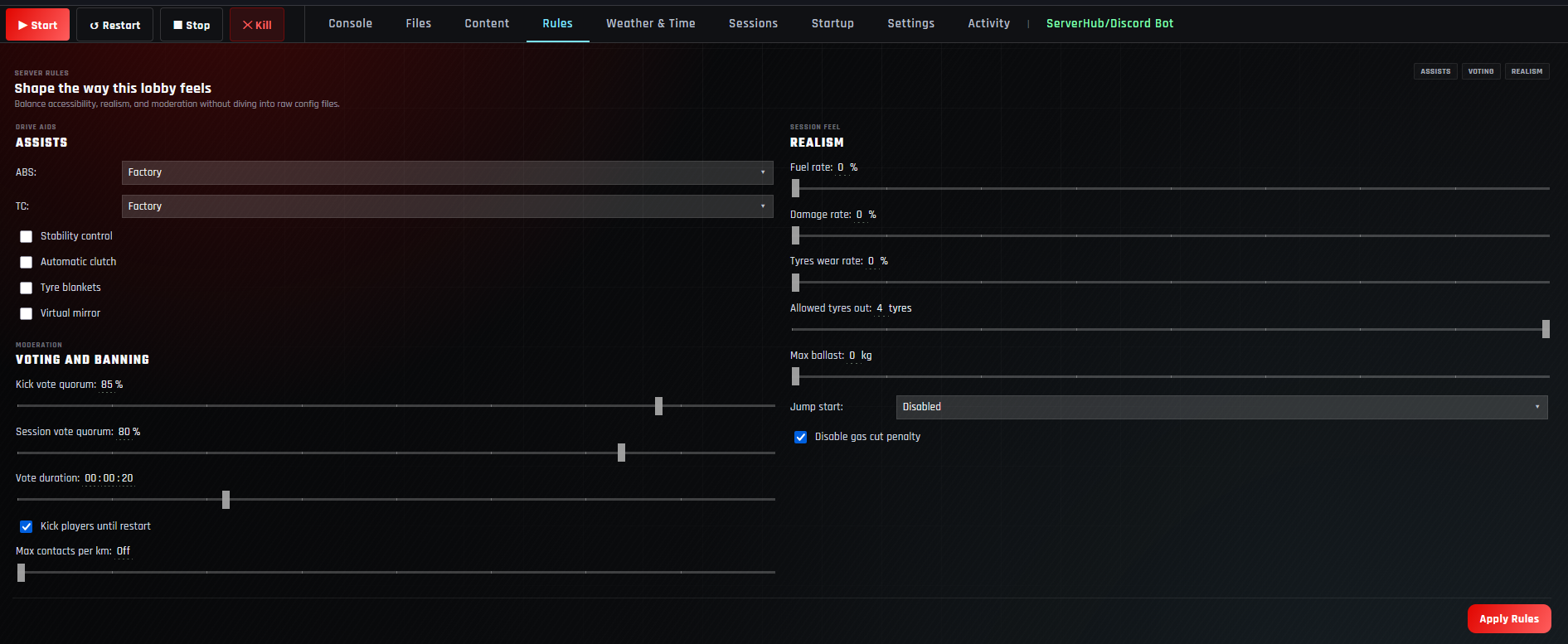
A casual public lobby usually benefits from factory assists and forgiving damage. A league race can use stricter track limits, realistic wear, and tested penalties.
Configure driver assists
| Setting | What it changes | Good starting point |
|---|---|---|
| ABS | Uses Factory, Off, or Forced as the server’s anti-lock braking policy. | Factory for mixed-car public events. |
| TC | Uses Factory, Off, or Forced as the traction-control policy. | Factory unless the series defines another rule. |
| Stability control | Allows the stability-control driving aid. | Off for realistic competition; optional for beginner events. |
| Automatic clutch | Allows automatic clutch assistance. | Enable when supporting varied hardware. |
| Tyre blankets | Allows the server’s tyre-blanket behavior. | Use the rule specified by the race format. |
| Virtual mirror | Forces the virtual mirror to be available to drivers. | Enable for visibility in public racing. |
Factory ABS and TC behavior depends on the vehicle. Check representative cars from the active entry list before publishing the rules.
Configure voting and moderation
- 1Set Kick vote quorum.
Choose the percentage of the lobby required to remove a disruptive driver.
- 2Set Session vote quorum.
Choose the percentage of the lobby required for a vote that advances or changes the active session.
- 3Set Vote duration.
Give drivers enough time to respond without leaving a vote open unnecessarily long.
- 4Choose Kick players until restart.
Enable it when a kicked driver should remain out until the game server restarts.
- 5Set Max contacts per km.
Leave it Off for manual moderation or use a tested limit for automated contact control.
In a small lobby, one or two votes can become a large percentage of the field. Test moderation values with the expected player count.
Configure realism, track limits, and penalties
| Setting | What it controls | What to verify |
|---|---|---|
| Fuel rate | Fuel consumption as a percentage of the normal rate. | Race distance and whether a pit stop is practical. |
| Damage rate | Damage severity as a percentage. | Use lower values for casual events and test race-ending impacts. |
| Tyres wear rate | Tyre wear as a percentage of the normal rate. | Compound life across the planned race length. |
| Allowed tyres out | How many tyres may leave the legal racing surface. | Track-specific boundaries and penalty consistency. |
| Max ballast | The maximum ballast value available to the server configuration. | Leave at zero unless the event uses balance adjustments. |
| Jump start | Disabled, Drive Through, or Teleport To Pits behavior. | Run at least one intentional false-start test. |
| Disable gas cut penalty | Turns off the server’s throttle-cut penalty behavior. | Keep the choice consistent with the event’s track-limit policy. |
Values above 100% increase fuel use, damage, or tyre wear; values below 100% reduce them. Test the full planned stint before requiring strategy.
Apply Rules, restart, and test the lobby
- 1Press Apply Rules.
Wait until the panel reports Rules applied.
- 2Restart the server.
Reload the generated configuration before testing.
- 3Join with a normal driver account.
Confirm the allowed assists match the server selection.
- 4Test voting and penalties.
Use another driver to verify vote thresholds, track limits, contacts, and jump starts.
- 5Complete a representative stint.
Check fuel, damage, tyre wear, and pit behavior over a realistic portion of the event.
Use the sessions guide for the event rotation and the weather and time guide for conditions and track grip.
Assetto Corsa server rules questions
Should ABS and TC be set to Factory?
Factory is a sensible default for mixed-car events because it follows each car’s intended equipment. Use Off or Forced only when the event rules require it.
What fuel, damage, and tyre-wear values should I use?
Start at 100% for a normal baseline. Adjust one rate at a time and complete a representative stint before committing to the event setup.
Should virtual mirror be enabled?
It is a practical visibility aid for public and mixed-skill racing. A realism-focused league can choose a stricter policy after confirming every driver has suitable mirrors or hardware.
What happens when Max contacts per km is Off?
The automated contact limit is disabled. Staff can still moderate the server through the normal administrative workflow.
Do rules apply without restarting?
Apply Rules writes the configuration, but restarting before the event ensures the running server has loaded the saved values.
Why did my private-server setting change?
Managed Apply actions can regenerate server_cfg.ini. If the server uses manual privacy values, follow the private server guide and recheck them after applying rules.
Set the standard for race night
Apply predictable rules and test them together
Begin with a stable baseline, verify the assists and penalties with another driver, and tune realism only after a representative stint.