
The quick answer
How do you enable Content Manager auto-download?
Paid Assetto Corsa plan required: CM Auto Download is locked on the free server plan. Choose and activate a paid Assetto Corsa hosting plan before following this guide.
Open your server panel and select Content. Add at least one car to the Current Entry List, choose a track and layout, then check CM Auto Download under Server Setup. Press Apply Selection. The panel builds cfg/cm_content/content.json with the download addresses for the selected cars and map. Start the server and test its Join in CM link from a computer that does not already have the custom content installed.
CM Auto Download publishes download information for the selected content. It does not repair a broken archive or make different mod versions compatible.
Enable CM Auto Download under Server Setup
- 1Find Server Setup.
It appears below the selected track on the right side of the Content tab.
- 2Check CM Auto Download.
The option should be interactive when the server has an eligible paid plan.
- 3Review the selected content.
Verify the track, layout, car rows, and content versions before applying.
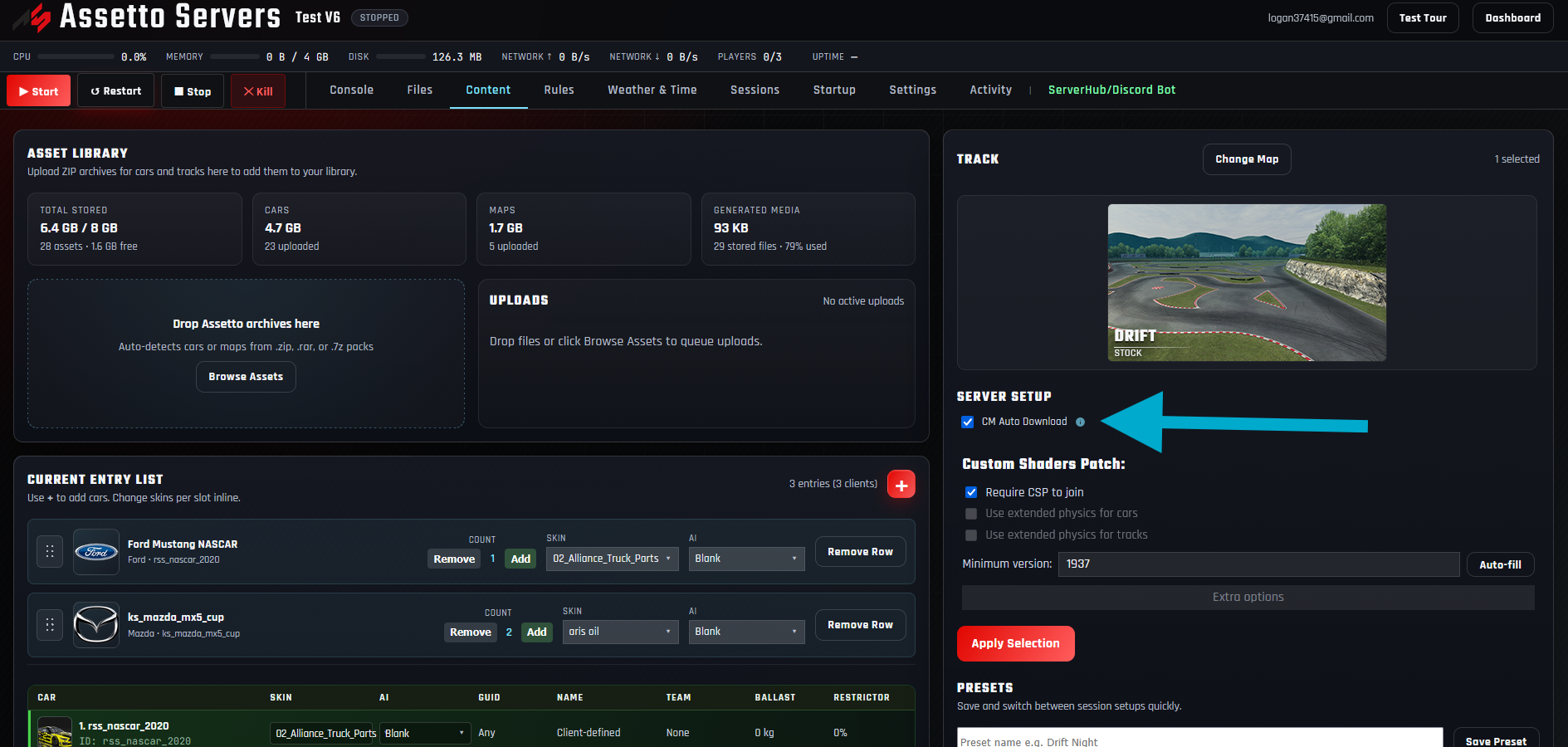
The current server is still on the free plan. Open the Assetto Corsa hosting plans, upgrade that game server, then reload the panel.
Apply the selection and verify content.json
Press Apply Selection and wait for the entire content operation to finish. The panel saves the active cars, track, layout, and CM Auto Download setting, then creates cfg/cm_content/content.json with a download entry for each selected car and the map.
- 1Press Apply Selection.
Leave the page open while the panel regenerates the server configuration.
- 2Wait for confirmation.
Do not restart or change the content while Apply Selection is working.
- 3Check the auto-download message.
An error about no cars or map means the active selection is incomplete.
- 4Optionally inspect Files.
Open cfg, then cm_content, and confirm content.json exists and contains the intended car IDs and track.
Fix the archive or Content selection in the panel and apply it again. That keeps content.json synchronized with the server’s active setup.
Start the server and test the Join in CM link
Start or restart the server so the applied configuration is active. For a meaningful test, use a separate Assetto Corsa installation or temporarily remove the custom content from the test computer. Open the panel’s Join in CM link and confirm Content Manager identifies the missing car and track downloads before joining.
If the test computer already has every mod, a successful connection proves the lobby works but does not prove auto-download works.
Reapply CM Auto Download whenever content changes
Treat the generated manifest as part of the active lobby setup. When you replace a mod archive, add or remove a car, change the track, or select another layout, review CM Auto Download and press Apply Selection again before sharing the Join link.
| Problem | Likely cause | What to check |
|---|---|---|
| CM Auto Download is disabled | The server is on the free plan. | Upgrade the Assetto Corsa game server to a paid hosting plan and reload Content. |
| content.json was skipped | No car entries or no map is selected. | Add at least one car, choose a map and layout, then apply again. |
| A car is not offered | It is stored but not in the active entry list, or its source archive has no download address. | Re-upload the complete archive, add the car to Current Entry List, and apply again. |
| The wrong track downloads | The manifest was generated before the latest map change. | Select the intended map and layout and run Apply Selection again. |
| The download fails | The source archive is unavailable or incomplete. | Re-upload a known-good archive and rebuild the manifest. |
| Download works but join fails | The client and server content versions still differ. | Follow the checksum failed guide and replace the mismatched package. |
Content Manager auto-download questions
What does CM Auto Download create?
The panel generates cfg/cm_content/content.json. It lists downloadable source information for the selected cars and map so Content Manager can identify required lobby content.
Does CM Auto Download work on the free server plan?
No. It is available on paid Assetto Corsa game-server plans. The option remains locked on the free plan.
Does it include every archive in Asset Library?
No. It follows the active lobby selection: cars in Current Entry List and the selected map. Unused stored assets are not included.
Do I need the Assetto Corsa Discord Bot Plan?
No. CM Auto Download is a game-server panel feature and does not require the Discord Bot Plan. It does require a paid Assetto Corsa hosting plan.
Does auto-download prevent checksum errors?
It helps drivers obtain the intended packages, but the installed files still have to match the server. A modified or different release can still produce a checksum failure.
When should I regenerate content.json?
Apply the Content selection again after changing a car, car archive, track, layout, or download source. Test the Join in CM link again before the next public event.
Can I use CM Auto Download for a private server?
Yes. The direct Join in CM link can still provide the required content information. Share the game password separately and follow the private server guide.
Make custom content easier to join
Enable CM Auto Download on a paid server
Publish the selected cars and track through Content Manager, then test the complete download and join path before inviting drivers.